Introducing the Visual Email Builder: Create polished candidate emails with confidence
 Updated
by
Amy Thomas
Updated
by
Amy Thomas
Candidate communication is one of the most important touchpoints in your hiring process. Clear, well-branded emails help candidates understand what to do next, reduce confusion, and improve completion rates, especially when you’re sending assessment or video interview invitations.
That’s why we’re introducing the Visual Email Builder in the Criteria platform: a new, easier way to create and manage invitation and reminder email templates.
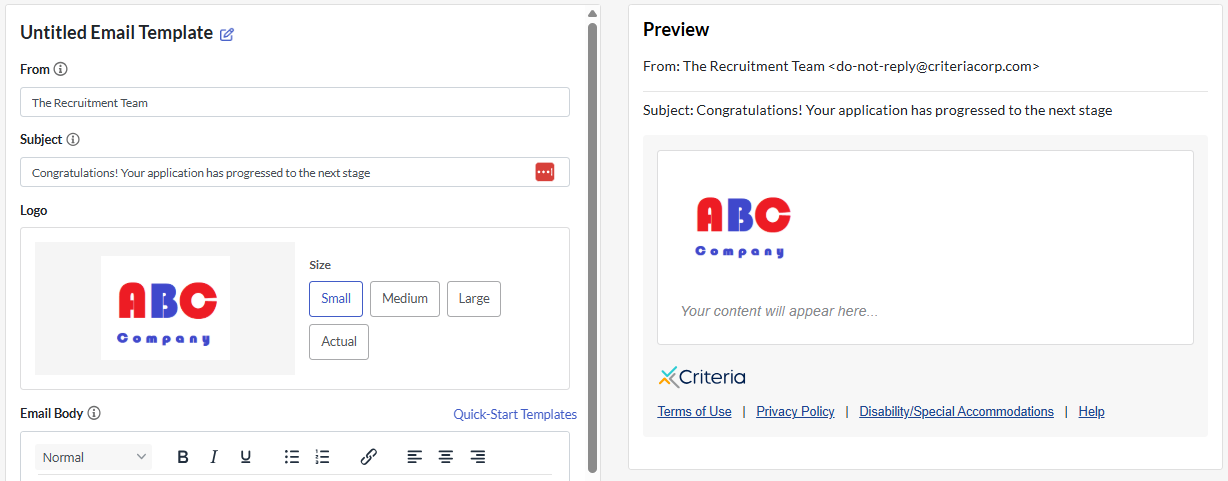
Design emails visually - with a live preview
With the Visual Email Builder, you can create templates in our guided editor while the Preview panel updates automatically as you add and adjust content. This makes it easier to see what candidates will receive and helps reduce the trial-and-error that often comes with formatting candidate communications.
Build branded templates that look professional
The builder makes it simple to create emails that reflect your organization and provide the details candidates need. You can configure key template elements such adding your logo and information specific to your organization.
This means your candidate emails can look consistent across teams and roles, without relying on specialized technical skills.
Start faster with Quick-Start Templates
Not sure what to say? The builder includes Quick-Start Templates you can view and copy, helping you get to a strong first draft quickly. This is especially helpful if you want to clarify the type of task a candidate is being invited to complete and ensure your message aligns with the candidate experience you want to deliver.
For additional guidance, you can download our Candidate Communication Toolkit for tips on improving your candidate experience.
