Humanforce Talent Integration Enhancements
 Updated
by
Integrations Team
Updated
by
Integrations Team

Your Criteria integration is being upgraded from LiveHire to Humanforce Talent. Most things work the same way you're used to, with a few welcome improvements. This article covers what's new, some optional features you can turn on, and what to expect during the move.
What's new
Expanded assessment and interview invitations
With the upgraded integration, you can now invite candidates to a wider range of activities directly through Criteria:
- Structured interviewing — invite candidates to video interviews (with human or AI evaluators) or live interviews.
- Combined packages — invite candidates to packages that include both video interviewing and assessments together.
- Proctored testing — invite candidates to proctored tests where needed.
SMS invitations and reminders
You can now send candidates invitation and reminder SMS messages through the integration. To enable this, turn on SMS in your Criteria account.
Improved Assessment Status Display
With the addition of video interviewing, a single invitation can now include both assessments and an interview. To communicate all the relevant information in one place, the Assessment field in the Humanforce Talent candidate list has been updated.
Previously, this field only showed score range information — Met Score Ranges or Did Not Meet Score Ranges. It now shows the candidate's current status alongside their score range result, so you can see exactly where a candidate is in the process at a glance.
This status is displayed in the Activity column in the candidate list:

Status shown | What it means |
Evaluating | In Range | Candidate is still with evaluators, and has met your score ranges on the completed assessments |
Evaluating | Out of Range | Candidate is still with evaluators, and has not met your score ranges on the completed assessments |
Evaluating | Candidate is with evaluators; no score range set, or no assessments included |
Completed | In Range | Evaluation is complete and candidate met your score ranges on the completed assessments |
Completed | Out of Range | Evaluation is complete and candidate did not meet your score ranges on the completed assessments |
Completed | Evaluation is complete; no score range set, or only an interview was completed |
Optional: New Candidate Status Changes
These candidate status updates are optional — only set them up if they'd be useful for your recruiting workflow.
If you'd like to use them, create the relevant stages in your Humanforce Talent recruiting workflow first, then share the exact status names with Criteria so we can configure them in your integration.
Status | What it does |
Evaluating | Moves candidates to a separate status while they're being evaluated, so they're clearly distinct from candidates who've just been invited. Set this up if you are using Video Interviewing without Automated Scoring. |
Completed + In Range | Moves candidates to a new status once they've completed assessments and met your score ranges in Criteria. Set this up if you have score ranges configured in Criteria. |
You can also use your own custom status names — you're no longer limited to Criteria's pre-defined names.
Optional: Additional Features
The following features are available on request. Reach out to your Criteria contact to enable any of these.
Indeed Easy Apply candidates
If you use Indeed Easy Apply, candidates are imported into Humanforce Talent by Indeed and don't go through the standard Humanforce Talent application workflow — so they won't be automatically invited to your inline testing package. We can configure your integration to invite these candidates automatically.
Manually assigned candidates
If candidates are added manually and assigned to a job in Humanforce Talent, they also bypass the standard application workflow and won't be automatically invited to your inline testing package. We can configure your integration to cover these candidates too.
Report Visibility Controls
If you'd prefer your users don't see full test reports for all candidates, and Humanforce Talent permissions don't restrict access at the level that you need, there are a few options:
- Send only the summary report
- Send only the personality test report
- Link to the candidate in Criteria (users will need to log in to access detailed results)
Custom Main Score
If you use a score other than the Talent Signal as your primary decision point, we can configure the integration to send that score as the main score into Humanforce Talent — so it appears in the candidate list.
What's staying the same
Activity feed
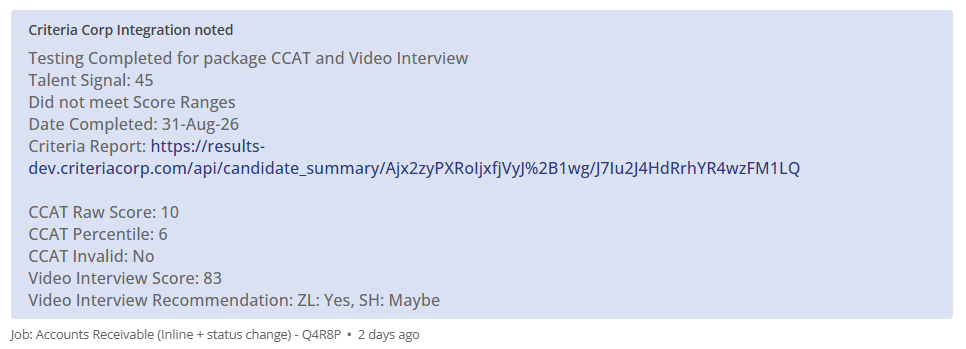
The activity feed in Humanforce Talent works the same way as before. For each candidate, it still shows:
- The report link for completed tests
- The main scores for all completed assessments
- For video interviews, the overall score and recommendation are also shown (new)
The layout looks slightly different, but the information is all there. See the screenshot below for reference.
What to expect
We'll migrate you to the new integration once it's ready. The experience is largely the same as LiveHire, with the enhancements described above — so the transition should be smooth.
If you'd like to make use of the new capabilities, here's what setup looks like:
- Interviewing packages — If you want to invite candidates to interviews through the integration, you'll need to add the relevant packages in Humanforce Talent first. Reach out to Criteria Support and we can help you get these set up.
- Proctored testing — Proctoring can be enabled on any existing package in Criteria. No changes are needed in Humanforce Talent or the integration.
To get started with any optional features, or if you have questions, reach out to the Criteria support team.
