iCIMS Standard Integration Enhancements
 Updated
by
Integrations Team
Updated
by
Integrations Team
- What's Changing & Why It Matters
- 🎯 Better Visibility into Candidate Progress
- 📊 Enhanced Results Display
- 📦 Simplified Package Management (Criteria-only customers) [Optional]
- 🔧 More Flexible Package Options [Optional]
- 🛡️ Proctoring Support [Optional]
- ♻️ Reuse Assessment Results [Optional]
- 🔄 Two-Round Assessment Workflows [Optional]
- ⚙️ Configurable Automation for Video Interviews [Optional]
- 🗂️ Flexible Custom Field Mapping [Optional]
- Next Steps
We've enhanced the Criteria + iCIMS Standard integration with new features that improve visibility, streamline package management, and provide greater flexibility in your assessment workflows.
What's Changing & Why It Matters
🎯 Better Visibility into Candidate Progress
What's New:
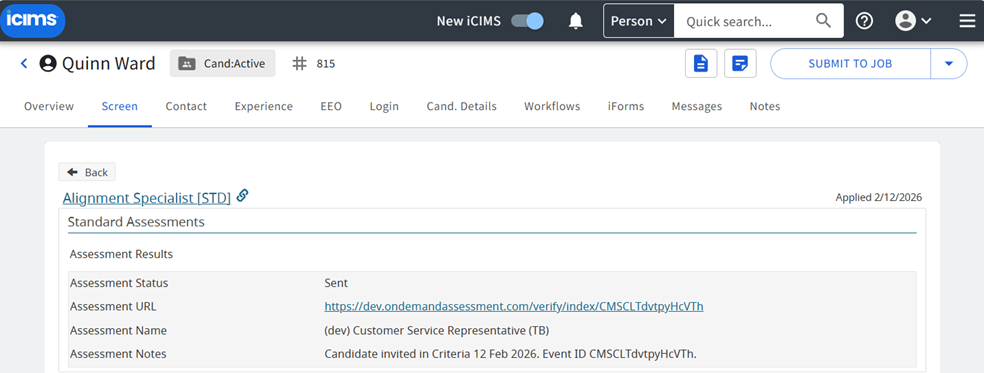
- A new "Sent" status now appears in iCIMS when a candidate is successfully invited to complete an assessment in Criteria
- The Assessment tab for a candidate will show if you have already invited them for testing
- The Event ID is displayed for easy lookup in Criteria (helpful if you need to extend deadlines or troubleshoot)
- Status labels now better reflect the assessment journey:
- "Sent" → "Complete" (for assessments)
- "Sent" → "In Progress" → "Complete" (for video interviews)
Why This Matters: You'll have real-time confirmation that invitations were sent successfully and can track candidates more accurately through each stage.
📊 Enhanced Results Display
What's New:
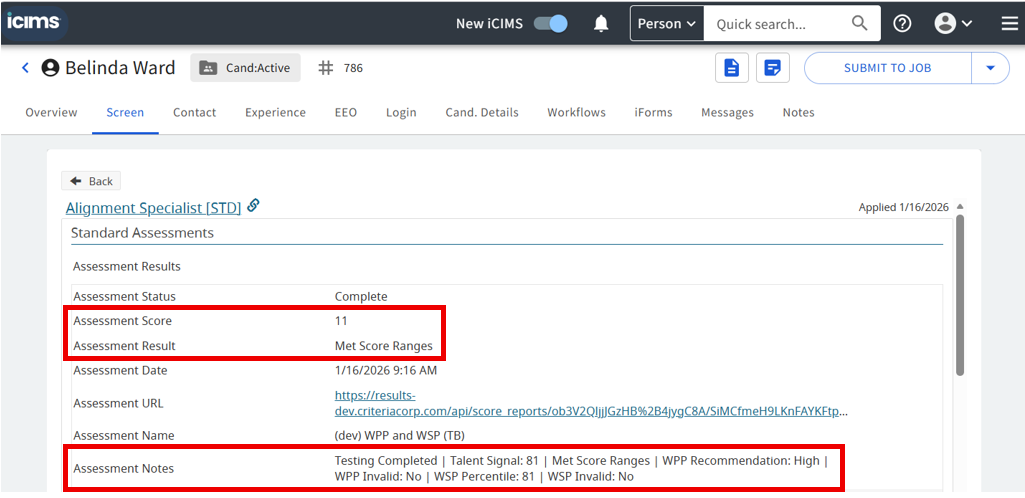
- Multiple scores now visible directly in iCIMS
- Talent Signal easily available directly in iCIMS (or you can choose which score maps to the "Assessment Score" field)
- "Met Score Ranges" indicator displays whether candidates meet your benchmarks
- Notes field shows main scores for all completed tests
Why This Matters: Make faster, more informed decisions without switching between platforms. All key candidate data is at your fingertips in iCIMS.
Action Available: Discuss with your CSM if you'd like to customize which score appears as the primary "Assessment Score."
Don't want this? Criteria can continue to send no scores to iCIMS, or can just send the Score Ranges outcome without the actual score values, just tell you CSM your preference.
📦 Simplified Package Management (Criteria-only customers) [Optional]
What's New:
- A Sync button in the Criteria platform automatically updates your Assessment Type and Assessment Name lists in iCIMS
- No more manual package management or mismatches between platforms
Why This Matters: Saves time, eliminates errors, and ensures your iCIMS always reflects your current Criteria packages.
Important Note: This feature is available for customers using Criteria as their sole assessment provider in iCIMS. If you use multiple assessment vendors, you'll continue managing packages manually in iCIMS. Your CSM will confirm your eligibility.
🔧 More Flexible Package Options [Optional]
What's New:
- You can now use Jobs as packages (in addition to Test Batteries)
- This unlocks support for Video Interview-only and Live Interview-only packages
Why This Matters: Greater flexibility in how you structure your assessment process. Jobs-based packages support all assessment and structured interview types.
Action Required (Optional): If you'd like to migrate from Test Batteries to Jobs, please discuss with your CSM. This requires coordination and package updates on both sides.
🛡️ Proctoring Support [Optional]
What's New:
- Proctoring settings are now fully supported in the iCIMS Standard integration
Why This Matters: Maintain assessment integrity with proctoring options directly through your iCIMS workflow.
♻️ Reuse Assessment Results [Optional]
What's New:
- Candidates who have recently completed assessments can have their results reused for new applications
Why This Matters: Improved candidate experience (no redundant testing) and faster time-to-hire for candidates already in your talent pool.
🔄 Two-Round Assessment Workflows [Optional]
What's New:
- Support for sequential assessment rounds within iCIMS
- Set up a second workflow status that automatically triggers invitations to a second Criteria package
Why This Matters: Easily implement multi-stage assessment processes (e.g., initial screening + finalist assessment) without leaving iCIMS.
⚙️ Configurable Automation for Video Interviews [Optional]
What's New:
- For packages containing Video Interviews, you can now choose when the Assessment Status is set to "Completed":
- Option 1: When the candidate completes the video interview
- Option 2: When your team completes the evaluation in Criteria (default)
Why This Matters: Align your iCIMS automation triggers with your actual hiring workflow and timeline.
Action Available: Let your CSM know if you'd like to change when "Completed" status is triggered.
🗂️ Flexible Custom Field Mapping [Optional]
What's New:
- Custom fields can now be mapped at either the candidate level or application level (application is default)
Why This Matters: Better alignment with how your organization uses iCIMS data and reporting.
Next Steps
- Review this summary and identify which enhancements are most valuable for your workflow
- Schedule a call with your CSM if you'd like to:
- Enable package syncing (Criteria-only customers)
- Migrate from Test Batteries to Jobs
- Customize when "Completed" status triggers for Video Interviews
- Adjust which score is display in your Assessment Score field
- Discuss custom field mapping options
- These enhancements will be rolling out by February 23rd 2026 - no action is required to receive most features, but we want to ensure you're taking full advantage of what's available.
Have feedback? We built these enhancements based on customer input. Let us know what's working well and where we can continue to improve.
